Emoji Battery & Shimeji Pet
- 4.2
- Rating
- 1.00M
- Installs
- Free
- Price

 Analysis by App-foxy
I like phone customization best when it changes something I actually see during the day, rather than adding another theme I forget about after setup. Emoji Battery & Shimeji Pet is aimed at that kind of personal touch: it brings a character-oriented screen-pet idea together with a battery icon you can customize. My first impression is that it suits people who enjoy a phone that feels playful and personal, without treating appearance as a serious project.
It is a free personalization app from Tools for Everyday - AI Tasks, with optional in-app purchases priced from $2.99 to $19.99 per item. The app has a 4.2 average from around 67,000 ratings, and more than a million installs. Those figures suggest that its cute, lightweight concept has broad appeal, but they do not tell you whether its particular look will suit your taste. I would approach it as a small visual upgrade, not as a tool that changes how the phone works.
What the app adds to an ordinary screen
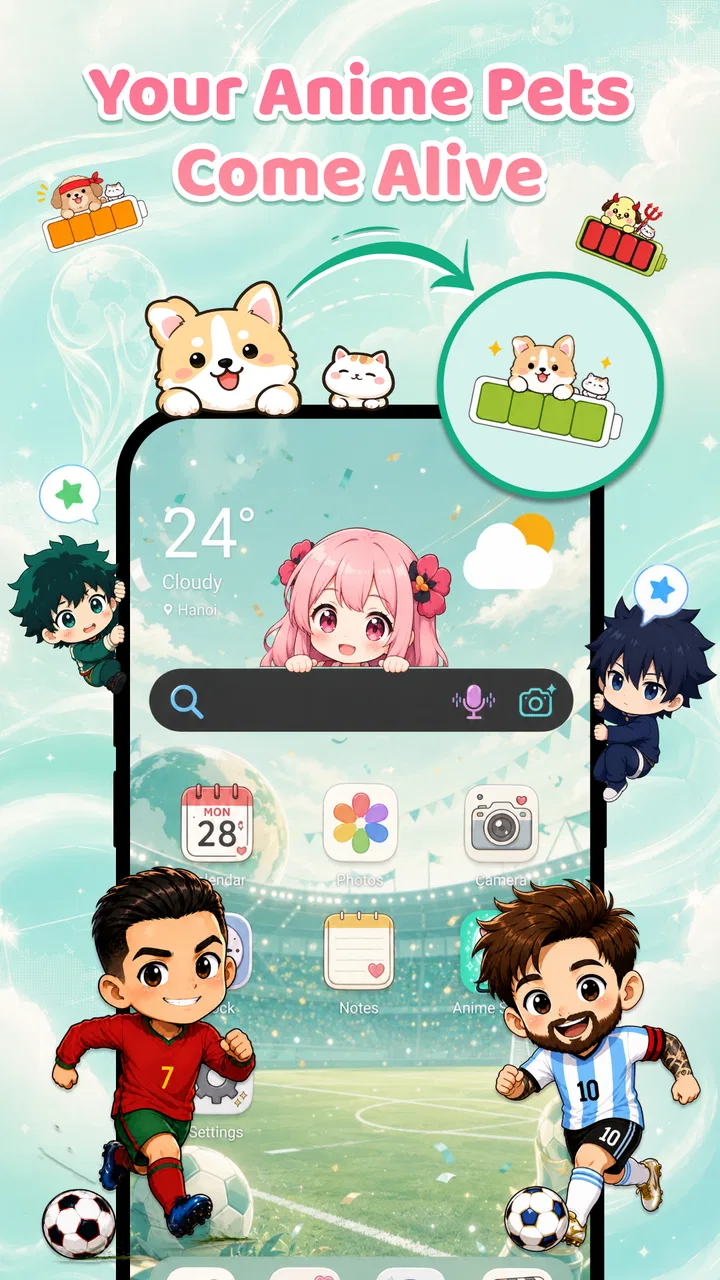
The appeal is the combination of a Shimeji screen pet and an emoji battery icon. Instead of choosing only a wallpaper or a conventional icon theme, you can make a familiar status detail feel more expressive and add a little character to the screen. That makes the app most compelling for people who already enjoy cute mascots, emoji, or decorative phone setups.
You May Also Like

 Blood Strike: 2.5 Anniversary
Blood Strike’s Loadouts Turn Every Drop Into a Tactical Gamble
A close look at Blood Strike’s custom loadouts: how fast access to signature weapons reshapes its battle royale rhythm, rewards preparation, and narrows the gap between fights.

 Pandora - Music & Podcasts
Pandora’s Music Is Easy to Start, but Harder to Recover
Pandora’s strength is its low-effort path from a seed to a station. Its weak spot is how much confidence it asks you to place in connection, setup, and quiet recovery.

 8 Ball Pool
 Is Built on Rivalries, Rematches, and Routine
A close look at the rivalries, rematches, shared routines, and unanswered safety questions that turn a quick pool match into a persistent mobile community.

 Samsung Music
’s Quiet Strength Is Playing What You Already Own
Its reach comes less from spectacle than from dependable access to a personal library. That simplicity is both the app’s strongest retention engine and its ceiling.

 AccuWeather: Weather Radar
AccuWeather Review: A Quick, Clear Forecast for Everyday Decisions
For everyday plans, the best forecast is the one you can understand quickly. AccuWeather makes rain timing, radar, and local conditions easy to act on, with a few trade-offs.

 Hill Climb Racing
Why Hill Climb Racing Still Turns Crashes Into One More Run
A tiny car, a bumpy hill and one more upgrade: Hill Climb Racing keeps resurfacing because its simple chaos makes every near-miss feel personal.
More From Our News Desk



There is a useful distinction between this and a launcher or full theme pack. Those alternatives can reshape icons, layouts, and the overall interface; this app’s stated focus is narrower. That can be an advantage if you want a small change without rebuilding your home screen. It can also be a limitation if you expect a complete makeover, deep layout control, or a practical battery-monitoring dashboard.
I would judge the result by whether the decoration remains pleasant after the novelty wears off. A character or colorful battery detail can make routine checks feel more cheerful, but it also puts extra visual emphasis on parts of the screen you may prefer to keep simple. The best fit is someone who wants a phone to show a bit of personality, not someone who values a minimal, uniform interface above all else.
Start with one change, not a full makeover
For a first-time user, I would keep the initial experiment deliberately small. Install the app, look through the available customization choices, and begin with the battery appearance or pet element that most interests you. Make one change, then use the phone normally for a while. This gives you a clear sense of whether that particular decoration works with your wallpaper and everyday screen, instead of making several changes and then having to work out which one feels distracting.
The listing gives the app an Everyone content rating, and its current version is 1.0.7. It is listed for devices running Android 8.0 or later. Those details help establish whether it is a plausible option for your device, but the day-to-day decision is more personal: do you want a visible decorative layer, and are you comfortable with the way it fits alongside your existing setup?
My practical tip is to check the phone in the places you normally look at it: the home screen, the status area, and any screen where the battery indicator is visible. A custom icon that looks charming in a selection view may compete with a busy wallpaper or clash with a restrained theme. If that happens, try a simpler combination rather than assuming the entire idea is wrong.
Your first satisfying result
A good first session does not need to involve finding every option. It is enough to choose a battery design you can recognize at a glance, pair it with a pet style you genuinely like, and then return to your ordinary routine. The meaningful test is whether you notice the change pleasantly when checking the phone, rather than whether you can spend a long time browsing decorations.
Here is a realistic use case: imagine you are waiting for a message between errands and glance at your phone several times. A small animated or character-led visual touch can make those brief checks feel less generic. If you share your phone’s screen with family or friends, it can also become an easy way to make the device feel distinctly yours. Neither use case depends on the app being a productivity tool; the value is entirely in the visual experience.
One trade-off worth considering is visibility versus calm. If your wallpaper is already colorful, a prominent pet and a bright battery treatment may make the screen feel crowded. I would test the app against your actual background rather than choosing everything in isolation. For a cleaner look, keep one element as the star and let the other play a supporting role.
Where new users can get tripped up
The word “battery” can create expectations that this is mainly a utility for measuring battery health or extending battery life. I would not choose it for those purposes. Its described appeal is a custom emoji-style battery icon, so think of it as decoration around a familiar phone element, not a replacement for the system’s battery settings or a diagnostic tool.
Similarly, “screen pet” may sound like a game with goals, care routines, or progression. The app’s positioning is personalization, so I would approach the pet as a visual companion rather than expecting a full game. That distinction matters if you are deciding between this and a virtual-pet game: choose the game if interaction and ongoing activities are what you want; choose this app if the main attraction is a more playful phone appearance.
Another common source of confusion is expecting every customization choice to be free. The app itself is free to install, but it includes optional purchases, with items ranging from $2.99 to $19.99. I recommend exploring the free experience first and deciding whether you enjoy the basic idea before paying for anything. The listed range alone does not mean you need to spend money to try the app, nor does it tell you which individual item is right for you.
There is also a practical difference between a decorative change and a system-wide transformation. If you want matching icons across every app, a redesigned home-screen grid, or a wallpaper-and-widget package, a launcher or a broader theme app may be a better match. This app makes more sense when you want the narrower, character-and-battery angle without committing to a total interface overhaul.
Make it fit your routine
Once the first setup feels right, use the phone as you normally would before adding more decoration. Notice whether the battery treatment stays easy to read, whether the pet feels charming or intrusive, and whether the visual style still works when you change wallpaper. That short real-world check is more useful than endlessly comparing options in one sitting, because it tells you whether the customization fits your habits rather than just looking appealing in a menu.
If you regularly switch between work and personal contexts, a playful screen may be a welcome break on a personal device but less suitable for a phone you use in formal meetings. In that case, I would keep the overall setup understated or use a different personalization approach that does not draw as much attention. Likewise, if your priority is maximum screen simplicity, the stock battery display may be the better choice.
For a new user, the most helpful next step is to refine only what you already know you like. If the emoji battery is the part you notice most, make that the focus; if the pet is what gives the phone character, avoid layering on extra visual choices just because they are available. This keeps the result intentional and makes it easier to tell whether the app is earning its place on your phone.
Who I would recommend it to
I would recommend Emoji Battery & Shimeji Pet to someone who enjoys cute personalization and wants a modest, visible change rather than a complete redesign. It is especially easy to understand if you already customize wallpapers, use emoji often, or like the idea of a small character adding warmth to routine screen checks. With an average rating of 4.2 and a sizeable audience, it is clearly not an obscure concept, though popularity cannot guarantee that every style will suit you.
I would skip it if you are looking for battery diagnostics, a serious power-management feature, a full launcher replacement, or a pet game built around ongoing interaction. I would also be cautious if decorative elements tend to distract you or if you prefer every system detail to remain visually uniform. Those are not faults so much as mismatches between the app’s playful purpose and what you need from a phone.
My overall view is that this is a focused personalization choice with an easy first experiment: add one visual detail, live with it through ordinary phone use, and keep it only if it makes the screen more enjoyable. The free entry point lowers the barrier to trying that idea, while optional purchases mean it is sensible to explore before spending. If you want a little character without rebuilding your interface, it is worth a look; if you want function, minimalism, or a whole new home screen, another kind of app will serve you better.
FAQs for Emoji Battery & Shimeji Pet
01What does Emoji Battery & Shimeji Pet do?
Emoji Battery & Shimeji Pet combines a battery display with decorative emoji and Shimeji-style pet characters. Depending on the features available in your version, it may let you customize how battery information appears and show a small animated companion on your screen. Treat it primarily as a personalization app: it does not increase battery capacity or improve your device’s actual battery life.
02Does Emoji Battery & Shimeji Pet work on Android and iOS?
Availability and supported features can vary by operating system, device, and app version, so check the app’s official store listing for your phone before downloading. Android and iOS also handle widgets, overlays, and background activity differently, which can affect how battery information or animated pets appear. Review the listed requirements and recent user feedback to confirm the features you want are supported.
03Does the app drain battery or use a lot of phone resources?
Animated pets and frequent screen updates may use some processing power, and any app that refreshes information in the background can affect battery consumption. The actual impact depends on your device, settings, and how often you use its features. If you notice increased battery use or slower performance, try disabling animations or background access, and check your phone’s battery-usage settings.
04Is Emoji Battery & Shimeji Pet free, and does it include ads or in-app purchases?
The price, advertisements, and optional purchases can change between versions and regions. Check the current store listing for whether the app is free to install, whether it offers subscriptions or paid customization, and whether ads are included. Before confirming a purchase, read its price and renewal details carefully. You can also review the app’s permissions and privacy information in the listing.
05What permissions should I review before installing Emoji Battery & Shimeji Pet?
Check the permissions requested during installation and when enabling individual features. A battery display may need access to battery status, while a floating pet or overlay may request permission to appear over other apps; available permissions differ between Android and iOS. Grant only access that makes sense for the feature you want, and consult the developer’s privacy policy to understand how information is handled.
Pros
- Adds playful emoji and pet animations to the charging screen.
- Offers a simple way to personalize the phone battery display.
- Shimeji pets bring movement to an otherwise static screen.
- Provides a lighthearted visual touch without changing core phone settings.
- Can appeal to users who enjoy cute themes and animated characters.
Cons
- Animated pets may distract from important charging information.
- Battery and screen overlays may require several system permissions.
- Frequent animations could use extra battery or system resources.
- The visual style may not suit users who prefer a clean interface.
- Compatibility may vary across devices and Android versions.

Emoji Battery & Shimeji Pet
Gallery